Your vault. Every device. Always in sync.
ob-sync is enterprise-grade Obsidian ↔ Git sync in a single bash script — no daemons, no plugins, no extra dependencies. Checksummed backups before every risky move, a repair mode that tells the truth about failures, and a menu wizard that connects a brand-new vault in seconds.
$ ob-sync
  OBSIDIAN SYNC TOOL  ·  v9.6.4
  ------------------------------------------
  1) Sync      backup + rebase + push
  7) Repair    rebuild git metadata   ← now honest
  18) Init     new vault / first-time setup
  19) Switch  change the vault for this session ← new
  …
  Select an option [0-19]:
Why ob-sync
Serious sync, zero ceremony
Everything a phone-first vault needs to survive reality: shared-storage quirks, dead .git directories, conflicts from a second device, and 2 a.m. panic restores.
One-command sync
sync = pre-sync backup + commit + fetch + rebase + push, with a clear [ OK ] line for every step. Nothing hidden, nothing silent.
Nine layers of defense
Repo-state guards, lock files, checksummed tar backups, fsck health checks, unborn-HEAD handling — every operation is fenced.
Honest repair new in 9.3
When repair fails, ob-sync now prints the real error instead of a bare FAIL — and on FUSE/sdcardfs filesystems it falls back to a copy-based install automatically.
Init wizard new in 9.3
Brand-new vault? Menu option 18) Init asks for your repo URL and does git init + remote wiring + first sync — no terminal gymnastics.
Cron-ready & quiet
Schedule automatic syncs from the menu, get JSON output for scripts, and let the watchdog skip credential prompts when nobody is watching.
Trilingual + 435 tests
CLI, docs and this site in English, فارسی and Español. Every release is guarded by 435 automated tests — plus a dedicated user-error suite — before it ships.
Found by the marathon 9.6.4
A real-terminal test marathon drove every menu entry, every prompt and every hostile input through a genuine pty against a credential-gated remote — and caught three field bugs: repair crashed on machines that had never run a backup (mktemp without its directory), a trailing init -y was silently ignored, and the vault switcher called an out-of-range number a "directory". All three are fixed.
Quick start
Up and running in 3 steps
Works on Android (Termux), Linux and macOS. You only need a GitHub repo (private is fine) and 2 minutes.
📱 Android — Termux
Install Termux from F-Droid (not Play Store), then install curl:
pkg install curl
Run the installer:
curl -fsSL https://raw.githubusercontent.com/CheginiSoroush/obsidian-sync-scripts/main/mobile/install.sh | bash
Verify, connect your vault, open the menu:
ob-sync doctor     # 1. verify the environment
ob-sync init       # 2. asks for your GitHub repo URL
ob-sync            # 3. interactive menu — or 18) Init
🖥️ Linux & macOS
Clone the repository:
git clone https://github.com/CheginiSoroush/obsidian-sync-scripts.git
cd obsidian-sync-scripts
Run the desktop installer:
./desktop/install.sh
Init and sync:
ob-sync init && ob-sync sync
bash is convenient but blind. Prefer to inspect first? Read mobile/install.sh or use the git clone method.What it looks like
Real output, not a mockup
A genuine captured run of ob-sync sync integrating two remote commits.
$ ob-sync sync

  Full Synchronization
  ────────────────────────────────────────────────────────
  [1] Checking repository state
  [ OK ] Repository is in a safe state
  [2] Creating pre-sync backup
  [ OK ] Backup: pre-sync-20250612-143207.tar.gz
  [3] Committing local changes
  [ OK ] Committed 3 changed file(s)
  [4] Fetching remote state
  [5] Rebasing onto origin/main (2 remote commit(s))
  [ OK ] Integrated 2 remote commit(s)
  [6] Pushing to origin/main
  [ OK ] Pushed 1 commit(s)

  [ OK ] Sync complete — 2 commit(s) in, 1 commit(s) out
The interactive menu
Everything lives behind one number
Run ob-sync with no arguments. 19 actions, plain-English labels, no flags to memorize.
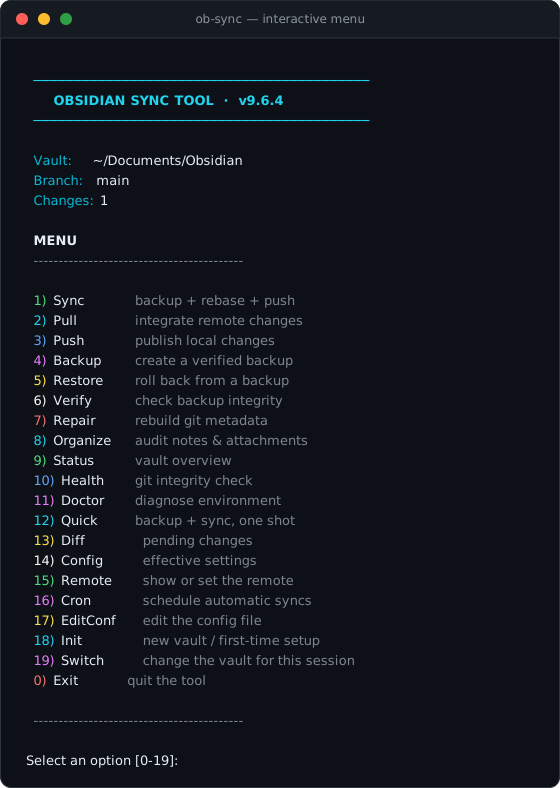
The actual TUI, rendered from the shipped source at v9.3.0 — 19) Switch joined in v9.4.0.
Recent releases
What's new since v9.3.0
Every one of these started as a field report from a real device.
Session vault switching 9.4.0
One machine, many vaults: menu 19) Switch moves the session to any discovered vault without rewriting the config, and init sets up git's credential helper once — so Termux stops asking for your password on every sync.
Prompts you can actually see 9.4.1
Credential prompts no longer vanish into swallowed stderr (the “Termux hang”): interactive output streams through, machine modes print git said: on failure, and a stall guard cuts a dead transfer in about a minute.
The vault identity card 9.5.0
<vault>/.ob-sync/config stores the vault's REMOTE and BRANCH inside the vault and is committed with it. A clone on a new device is ready to run; a lost origin is restored from the vault's own file — never from another vault's settings.
Survives the user 9.5.1
A dedicated user-error suite (56 checks) attacks the tool with CRLF-edited configs, quoted values, typo'd remotes and deleted .git folders. The gaps it found are fixed: hand-edited values parse clean, and a missing .git now gets an honest diagnosis plus a repair hint.
Mounted-drive vault discovery 9.5.2
Vaults on mounted drives are discovered automatically, and when nothing turns up you can type the path by hand — no more guessing where your notes live.
Self-update on launch 9.6.0
ob-sync checks a release URL on launch and swaps itself atomically to the new version. Offline devices get an honest bilingual notice and simply keep working; OB_NO_SELFUPDATE=1 silences the check completely.
Field-hardening backports 9.6.1
Branch injection and vault-escape closed, watchdog timeouts reported honestly, and a character-device log (/dev/full) can no longer hang a run — backported straight from the field-test campaign and covered by 95 human-error attack checks.
One-ask vault picker 9.6.2
Multi-vault devices used to be asked for a vault twice on every launch. Now the startup pick is asked once and pinned to the machine config — cron, piped runs and the next launches resolve silently, while 19) Switch stays the per-session switcher.
Prompts that answer back 9.6.3
On a phone, repair froze the moment you answered the username prompt — the watchdog had put the clone in a background process group, and git's credential read was stopped with SIGTTIN. Repair, Init and the doctor's connectivity check now run their network calls in the foreground for humans: the prompt is answerable, progress is visible, and interactive repair offers to remember your token.
Configuration
Two config layers — and your vault carries its own
ob-sync keeps device stuff on the device and vault stuff inside the vault. That split is what makes multi-device sync boring — in the best possible way.
🖥️ Device config — ~/.config/ob-sync/config
Describes this device: which vault is pinned, where backups live, branch overrides. Written by ob-sync init, editable via menu 17) EditConf — and it never leaves the machine. Environment variables (OBS_VAULT, OBS_REMOTE, …) always outrank it.
🪪 Vault identity card — <vault>/.ob-sync/config new in 9.5
Describes the vault: its REMOTE and BRANCH — two keys, nothing else. Written by init / remote, committed with the vault, and re-aligned with origin on every locked run: the card wins over a stale origin.
# .ob-sync/config — committed with the vault
REMOTE=git@github.com:you/MyVault.git
BRANCH=main
git clone git@github.com:you/MyVault.git
ob-sync init      # adopts the clone — remote already known
ob-sync sync      # green on the first run
When several sources disagree, the order is fixed: OBS_REMOTE → the vault's origin → the identity card → the device config (only for its own pinned vault). A vault with none of these refuses honestly and init asks — nothing is ever guessed. Even a deleted .git is recoverable: ob-sync repair rebuilds the metadata from the card's remote.
git config --global credential.helper store or gh auth login) and every device, cron job and widget reuses it. An automated test asserts the card stays credential-free.FAQ
Questions people actually ask
Still stuck? The troubleshooting guide and issue tracker are one click away.
Is my data safe? What if something goes wrong?
tar.gz backup first, and restore only rolls back from verified backups. Sync pushes are additive — ob-sync never rewrites published history with force.Does it ever force-push or lose my commits?
git rebase onto origin/main, so both devices' work survives. Conflicts are surfaced with clear guidance, never buried.Repair failed on my phone with [FAIL] — what now?
curl -fsSL https://raw.githubusercontent.com/CheginiSoroush/obsidian-sync-scripts/main/mobile/install.sh | bash). v9.3.0 prints the real underlying error and, on FUSE/sdcardfs filesystems where directory renames fail, falls back to a copy-based install automatically.How do I connect a brand-new vault?
ob-sync) and pick 18) Init. Confirm the vault path, paste your new GitHub repo URL, and ob-sync initializes git, wires the remote and performs the first sync. Empty directory? It clones. Existing notes? It adopts them.Does it need root or Obsidian plugins?
ob-sync doctor.Which platforms are supported?
mobile/install.sh for Termux, desktop/install.sh elsewhere.I cloned my vault to a new device — will it just work?
.ob-sync/config: the remote URL and branch travel inside the repository itself. Run ob-sync init once (it adopts the clone), then ob-sync sync — no remote questions asked. And if .git is ever lost, ob-sync repair rebuilds it from the card's remote.Where are my settings stored — is my token in there?
~/.config/ob-sync/config — pinned vault, backups) stays on the machine, and the vault identity card (.ob-sync/config — remote URL + branch) is committed with the vault so clones self-configure. Credentials belong to git's credential helper; an automated test guarantees the card never contains tokens or passwords.Found it useful?
A ⭐ on GitHub takes two seconds and genuinely helps other Obsidian users find ob-sync.
★ Star the repositoryوالت شما. هر دستگاه. همیشه همگام.
ob-sync همگامسازی حرفهای Obsidian ↔ Git در قالب یک اسکریپت bash است — بدون daemon، بدون افزونه، بدون وابستگی اضافه. بکاپ checksumدار قبل از هر عملیات پرخطر، حالت تعمیری که دربارهٔ خطا صادق است، و ویزارد منویی که والت تازه را در چند ثانیه وصل میکند.
$ ob-sync
  OBSIDIAN SYNC TOOL  ·  v9.6.4
  ------------------------------------------
  1) Sync      backup + rebase + push
  7) Repair    rebuild git metadata   ← now honest
  18) Init     new vault / first-time setup
  19) Switch  change the vault for this session ← new
  …
  Select an option [0-19]:
چرا ob-sync
همگامسازی جدی، بدون تشریفات
هر چیزی که والتِ گوشیمحور برای بقا در دنیای واقعی لازم دارد: عجیبوغریبهای حافظهٔ مشترک، پوشهٔ .git خراب، تعارض بین دو دستگاه، و بازگردانی اضطراری نیمهشب.
همگامسازی با یک دستور
sync یعنی بکاپ پیش از sync + commit + fetch + rebase + push، با یک خط [ OK ] شفاف برای هر مرحله. هیچچیز پنهان، هیچچیز بیصدا.
نُه لایه دفاع
محافظ وضعیت مخزن، فایل قفل، بکاپهای tar با checksum، بررسی سلامت با fsck، مدیریت unborn-HEAD — هر عملیات حصارکشیشده است.
تعمیر صادقانه جدید در ۹.۳
وقتی repair شکست میخورد، ob-sync حالا خطای واقعی را چاپ میکند نه یک FAIL خشکوشین — و روی فایلسیستمهای FUSE/sdcardfs خودکار به نصب کپیمحور برمیگردد.
ویزارد Init جدید در ۹.۳
والت تازه دارید؟ گزینهٔ 18) Init منو، URL مخزن را میپرسد و git init + اتصال ریموت + اولین sync را انجام میدهد — بدون معجونگیری ترمینالی.
آمادهٔ cron و بیسروصدا
همگامسازی خودکار را از منو زمانبندی کنید، برای اسکریپتها خروجی JSON بگیرید، و بگذارید watchdog هنگام نبودِ کاربر از پرامپتهای رمز عبور بپرد.
سهزبانه + ۴۲۸ تست
رابط، مستندات و این سایت به انگلیسی، فارسی و اسپانیایی. هر انتشار پیش از عرضه با ۴۲۸ تست خودکار — بهعلاوهٔ یک مجموعهتست اختصاصیِ خطاهای کاربری — محافظت میشود.
شروع سریع
در ۳ قدم راه میافتد
روی اندروید (Termux)، لینوکس و مک کار میکند. فقط به یک مخزن گیتهاب (خصوصی هم اشکال ندارد) و ۲ دقیقه وقت نیاز دارید.
📱 اندروید — Termux
Termux را از F-Droid نصب کنید (نه Play Store)، بعد curl را نصب کنید:
pkg install curl
نصبکننده را اجرا کنید:
curl -fsSL https://raw.githubusercontent.com/CheginiSoroush/obsidian-sync-scripts/main/mobile/install.sh | bash
بررسی، اتصال والت، باز کردن منو:
ob-sync doctor # ۱. بررسی محیط ob-sync init # ۲. URL مخزن گیتهاب را میپرسد ob-sync # ۳. منوی تعاملی — یا 18) Init
🖥️ لینوکس و مک
مخزن را کلون کنید:
git clone https://github.com/CheginiSoroush/obsidian-sync-scripts.git
cd obsidian-sync-scripts
نصبکنندهٔ دسکتاپ را اجرا کنید:
./desktop/install.sh
راهاندازی و همگامسازی:
ob-sync init && ob-sync sync
git clone استفاده کنید.شکلِ کار
خروجی واقعی، نه ماکت
یک اجرای واقعیِ ضبطشده از ob-sync sync که دو کامیت ریموت را یکپارچه میکند.
$ ob-sync sync

  Full Synchronization
  ────────────────────────────────────────────────────────
  [1] Checking repository state
  [ OK ] Repository is in a safe state
  [2] Creating pre-sync backup
  [ OK ] Backup: pre-sync-20250612-143207.tar.gz
  [3] Committing local changes
  [ OK ] Committed 3 changed file(s)
  [4] Fetching remote state
  [5] Rebasing onto origin/main (2 remote commit(s))
  [ OK ] Integrated 2 remote commit(s)
  [6] Pushing to origin/main
  [ OK ] Pushed 1 commit(s)

  [ OK ] Sync complete — 2 commit(s) in, 1 commit(s) out
منوی تعاملی
همهچیز پشت یک عدد
فقط ob-sync را اجرا کنید. ۱۹ عملیات، برچسبهای ساده، بدون فلگهایی که باید حفظ کنید.
خودِ TUI، رندرشده از سورسِ منتشرشده در نسخهٔ ۹.۳.۰ — گزینهٔ ۱۹ (تغییر والت) در نسخهٔ ۹.۴.۰ اضافه شد.
انتشارهای اخیر
از نسخهٔ ۹.۳.۰ به بعد چه چیزهایی عوض شد
هرکدام از اینها از یک گزارش میدانیِ واقعی شروع شد.
تغییر والت در همان نشست ۹.۴.۰
یک دستگاه، چند والت: گزینهٔ 19) Switch منو، نشست را بدون بازنویسی config به هر والت کشفشدهای میبرد، و init یک بار credential helper گیت را راه میاندازد — تا Termux دیگر هر بار رمز عبور نخواهد.
پرامپتهایی که واقعاً دیده میشوند ۹.۴.۱
پرامپت رمز دیگر در stderr بلعیدهشده گم نمیشود (همان «هنگِ Termux»): در اجرای تعاملی مستقیم نمایش داده میشود، حالتهای ماشینی «git said:» را چاپ میکنند، و stall-guard انتقالِ مرده را در حدود یک دقیقه قطع میکند.
کارت هویت والت ۹.۵.۰
<vault>/.ob-sync/config مقدار REMOTE و BRANCH والت را داخل خود والت نگه میدارد و همراهش کامیت میشود. کلون روی دستگاه تازه آمادهٔ اجراست؛ originِ گمشده از فایلِ خودِ والت بازسازی میشود — هرگز از تنظیمات والتِ دیگری.
در برابر خطای کاربر مقاوم است ۹.۵.۱
یک مجموعهتست اختصاصیِ خطاهای کاربری (۵۶ بررسی) با کانفیگهای CRLFدار، مقدارهای گیومهدار، ریموت اشتباهتایپشده و پوشههای .git حذفشده به ابزار حمله میکند. شکافهایی که پیدا شد رفع شدهاند: مقدارهای دستنویس تمیز پارس میشوند و نبودِ .git حالا تشخیص صادقانه + راهنمای repair میگیرد.
پیکربندی
دو لایهٔ پیکربندی — والت شما هویت خودش را حمل میکند
ob-sync چیزهای مربوط به دستگاه را روی دستگاه نگه میدارد و چیزهای مربوط به والت را داخل خود والت. همین تفکیک است که همگامسازی چنددستگاهی را بیدردسر میکند.
🖥️ پیکربندی دستگاه — ~/.config/ob-sync/config
این دستگاه را توصیف میکند: کدام والت سنجاق شده، بکاپها کجا ذخیره شوند، شاخهٔ پیشفرض. با ob-sync init نوشته میشود، از منو با 17) EditConf قابل ویرایش است — و هرگز از دستگاه خارج نمیشود. متغیرهای محیطی (OBS_VAULT، OBS_REMOTE و…) همیشه از آن بالاترند.
🪪 کارت هویت والت — <vault>/.ob-sync/config تازه در ۹.۵
خود والت را توصیف میکند: REMOTE و BRANCH — فقط دو کلید، نه بیشتر. با init / remote نوشته میشود، همراه والت کامیت میشود و در هر اجرای قفلدار با origin همتراز میشود: کارت از یک origin کهنه بالاتر است.
# .ob-sync/config — همراه والت کامیت میشود REMOTE=git@github.com:you/MyVault.git BRANCH=main
git clone git@github.com:you/MyVault.git ob-sync init # کلون را به فرزندی میگیرد — ریموت از قبل معلوم است ob-sync sync # همان اجرای اول سبز است
وقتی چند منبع با هم ناسازگارند، ترتیب ثابت است: OBS_REMOTE ← origin خود والت ← کارت هویت ← پیکربندی دستگاه (فقط برای والتِ سنجاقشدهٔ خودش). والتی که هیچکدام را ندارد صادقانه رد میکند و init میپرسد — هیچچیز حدس زده نمیشود. حتی .git حذفشده هم قابل بازیابی است: ob-sync repair متادیتا را از ریموتِ روی کارت بازسازی میکند.
git config --global credential.helper store یا gh auth login) تا همهٔ دستگاهها، cronها و ویجتها از همان استفاده کنند. یک تست خودکار تضمین میکند کارت هرگز شامل توکن یا رمز نباشد.سوالات متداول
سوالهایی که واقعاً پرسیده میشود
هنوز گیر کردید؟ راهنمای عیبیابی و باگترکر یک کلیک فاصله دارند.
امنیت دادههایم چطور است؟ اگر مشکلی پیش بیاید؟
tar.gz با مهر زمانی و checksum میسازد، و restore فقط از بکاپهای راستیآزماییشده برمیگردد. pushها افزودنیاند — ob-sync هرگز با force تاریخچهٔ منتشرشده را بازنویسی نمیکند.آیا force-push میکند یا کامیتهایم را گم میکند؟
git rebase روی origin/main است، پس کار هر دو دستگاه زنده میماند. تعارضها با راهنمای شفاف رو میشوند، هرگز دفن نمیشوند.repair روی گوشیام با [FAIL] شکست خورد — حالا چه؟
curl -fsSL https://raw.githubusercontent.com/CheginiSoroush/obsidian-sync-scripts/main/mobile/install.sh | bash). نسخهٔ ۹.۳.۰ خطای واقعی زیرین را چاپ میکند و روی فایلسیستمهای FUSE/sdcardfs که rename دایرکتوری در آنها شکست میخورد، خودکار به نصب کپیمحور برمیگردد.یک والت کاملاً تازه دارم؛ چطوری وصلش کنم؟
ob-sync) و 18) Init را بزنید. مسیر والت را تأیید کنید، URL مخزن تازهٔ گیتهاب را بچسبانید؛ ob-sync گیت را راه میاندازد، ریموت را وصل میکند و اولین sync را انجام میدهد. پوشه خالی؟ کلون میکند. یادداشت موجود؟ به فرزندی میگیرد.ریشه (root) یا افزونهٔ Obsidian میخواهد؟
ob-sync doctor محیط را برایتان بررسی میکند.روی چه پلتفرمهایی کار میکند؟
mobile/install.sh برای Termux، desktop/install.sh برای بقیه.والتم را روی دستگاه تازه کلون کردم — همینطوری کار میکند؟
.ob-sync/config حمل میکند: URL ریموت و شاخه داخل خود مخزن سفر میکنند. یک بار ob-sync init را اجرا کنید (کلون را به فرزندی میگیرد)، بعد ob-sync sync — هیچ سوالی دربارهٔ ریموت پرسیده نمیشود. و اگر روزی .git گم شد، ob-sync repair آن را از ریموتِ روی کارت بازسازی میکند.تنظیماتم کجا ذخیره میشوند — توکنم آنجاست؟
~/.config/ob-sync/config — والت سنجاقشده، بکاپها) روی خود دستگاه میماند، و کارت هویت والت (.ob-sync/config — URL ریموت + شاخه) همراه والت کامیت میشود تا کلونها خودشان را پیکربندی کنند. رمزها جایشان credential helper خود گیت است؛ یک تست خودکار تضمین میکند کارت هرگز شامل توکن یا رمز عبور نباشد.به دردتان خورد؟
یک ⭐ در گیتهاب فقط دو ثانیه طول میکشد و واقعاً کمک میکند کاربرهای دیگر Obsidian هم ob-sync را پیدا کنند.
★ ستارهدار کردن مخزن